Unitec Fibres Ltd. कंपनी का इतिहास और वार्षिक वृद्धि विवरण
Our Company was originally incorporated on February 11, 2005 under the name ÂUnitec Fibres Private Limited under the provisions of the Companies Act, 1956 with the Assistant Registrar of Companies, Mumbai, Maharashtra. Subsequently, the status of the Company was changed to public limited Company and the name of our Company was changed to ÂUnitec Fibres Limited vide Special Resolution passed by the Shareholders at the Extra-Ordinary General Meeting of our Company held on February 14, 2024. The fresh certificate of incorporation consequent to conversion was issued on June 13, 2024, by Registrar of Companies, Central Processing Centre. The Corporate Identification Number of our Company is U17120MH2005PLC151224.
MAJOR EVENTS: 2005 - Incorporation of our Company under the name ÂUnitec Fibres Private LimitedÂ
2019 - ISO 9001:2015 in accordance with the requirements of Quality Management System Standard. - ISO 14001: 2015 in accordance with the requirements of Environmental Management System Standard.
2024 - Conversion of our Company from Private Limited to Public Limited Company in the name and style of ÂUnitec Fibres LimitedÂ
Disclaimer: This is 3rd Party content/feed, viewers are requested to use their discretion and conduct proper diligence before investing, GoodReturns does not take any liability on the genuineness and correctness of the information in this article
Notifications
Settings
Clear Notifications
No New Notifications
Notifications
Use the toggle to switch on notifications
Block for 8 hours
Block for 12 hours
Block for 24 hours
Don't block
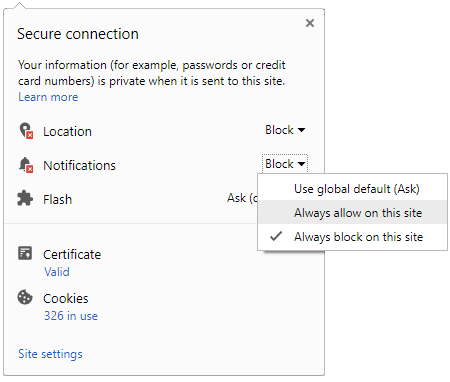
To start receiving timely alerts, as shown below click on the Green “lock” icon next to the address bar
Click it and Unblock the Notifications
Close X
Close X
To Start receiving timely alerts please follow the below steps:
Click on the Menu icon of the browser, it opens up a list of options.
Click on the “Options ”, it opens up the settings page,
Here click on the “Privacy & Security” options listed on the left hand side of the page.
Scroll down the page to the “Permission” section .
Here click on the “Settings” tab of the Notification option.
A pop up will open with all listed sites, select the option “ALLOW“, for the respective site under the status head to allow the notification.
Once the changes is done, click on the “Save Changes” option to save the changes.



 Click it and Unblock the Notifications

 Sign in with Google