अब ओला-उबर की तरह फ्लाइट्स में भी होगी शेयरिंग सर्विस
News
oi-Ashutosh
By Ashutosh
ओला-उबर की तरह अब एयरलाइन्स कंपनियां भी शेयरिंग सर्विस का ऑफर दे सकती हैं। समाचार पोर्टल इकोनॉमिक टाइम्स ने इस हवाले से खबर प्रकाशित करते हुए लिखा है कि, बिजनेस जेट ऑपरेट करने वाली कंपनियां हवाई यात्रा को अधिक सुविधाजनक और सस्ता बनाने के लिए इस तरह की सर्विस देने की तैयारी कर रही हैं।
यह ओला और ऊबर की ओर से ऐप के जरिए दी जाने वाली शेयरिंग कैब सर्विस की तरह होगी। इसमें एक कंपनी मार्केट में उपलब्ध सभी बिजनस जेट को एक प्लेटफॉर्म पर पेश करेगी, जिसके जरिए यात्री बुकिंग करा सकते हैं। देश में लगभग 129 जनरल एविएशन ऑपरेटर हैं। इनमें से 60 के फ्लीट में फिक्स्ड-विंग एयरक्राफ्ट हैं और बाकी के पास केवल हेलिकॉप्टर हैं।
आमतौर पर अधिकतर एविएशन चार्टर कंपनियां केवल एक शहर या रीजन में ही ऑपरेट करती हैं। इस वजह से वे कस्टमर्स से अपने होम बेस पर एयरक्राफ्ट को रखने से जुड़ी कॉस्ट, ट्रिप की वास्तविक कॉस्ट और वापस खाली लौटने की कॉस्ट वसूलती हैं।
प्राइवेट जेट और हेलिकॉप्टर सर्विस ऑनलाइन उपलब्ध कराने वाली फर्म जेटसेटगो का कहना है कि शेयरिंग के मॉडल के साथ बिजनस जेट को चार्टर करने की कॉस्ट 50 पर्सेंट तक कम हो सकती है। जेटसेटगो की सीईओ और को-फाउंडर, कनिका टेकरीवाल हैं और इसके इनवेस्टर्स में क्रिकेटर युवराज सिंह शामिल हैं।
Notifications
Settings
Clear Notifications
No New Notifications
Notifications
Use the toggle to switch on notifications
Block for 8 hours
Block for 12 hours
Block for 24 hours
Don't block
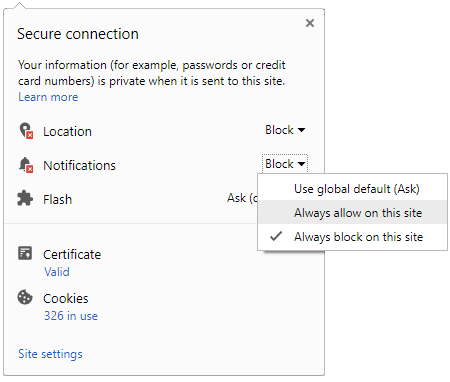
To start receiving timely alerts, as shown below click on the Green “lock” icon next to the address bar
Click it and Unblock the Notifications
Close X
Close X
To Start receiving timely alerts please follow the below steps:
Click on the Menu icon of the browser, it opens up a list of options.
Click on the “Options ”, it opens up the settings page,
Here click on the “Privacy & Security” options listed on the left hand side of the page.
Scroll down the page to the “Permission” section .
Here click on the “Settings” tab of the Notification option.
A pop up will open with all listed sites, select the option “ALLOW“, for the respective site under the status head to allow the notification.
Once the changes is done, click on the “Save Changes” option to save the changes.



 Click it and Unblock the Notifications


 Sign in with Google